Error
This page details the actions available to Errors.
Out
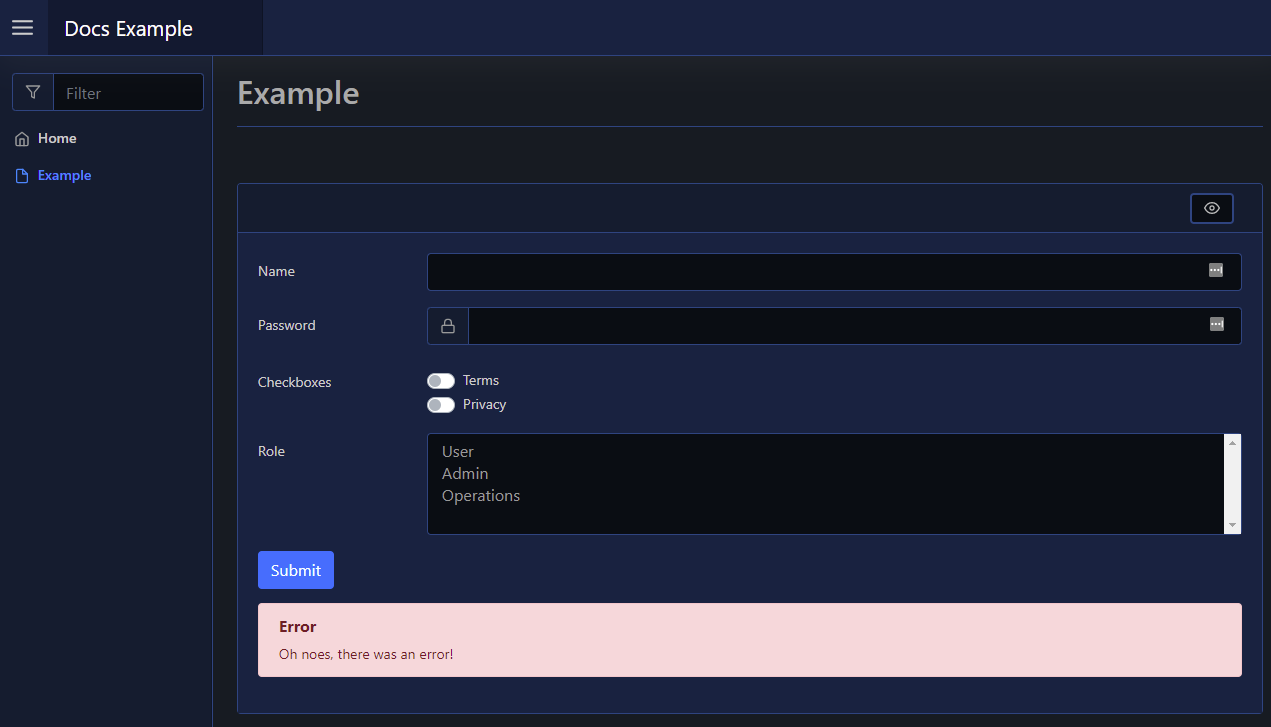
To create/show an error alert, such as when a form throws an unexpected error, you can use Out-PodeWebError. This will render an error alert beneath the element/sender that triggered the action (such as a a form, or a button). These errors will automatically be removed if the form is resubmitted.
New-PodeWebCard -Content @(
    New-PodeWebForm -Name 'Example' -ScriptBlock {
        Out-PodeWebError -Message 'Oh noes, there was an error!'
    } -Content @(
        New-PodeWebTextbox -Name 'Name'
        New-PodeWebTextbox -Name 'Password' -Type Password -PrependIcon Lock
        New-PodeWebCheckbox -Name 'Checkboxes' -Options @(
            'Terms', 'Privacy' | ConvertTo-PodeWebOption
        ) -AsSwitch
        New-PodeWebSelect -Name 'Role' -Multiple -Options @(
            'User', 'Admin', 'Operations' | ConvertTo-PodeWebOption
        )
    )
)
Which would look like below: